How mintbot handles files
When you send a photo, document, voice note, spreadsheet, screenshot or PDF to your mintbot agent — through Telegram, the web panel, or the API — the file is stored on your agent's own VPS and nowhere else. It stays there for as long as you want, and the LLM gets a working copy prepared for it.
This is a quiet design decision with loud consequences. It's worth spelling out, because it's one of the bigger places mintbot diverges from consumer LLM chat.
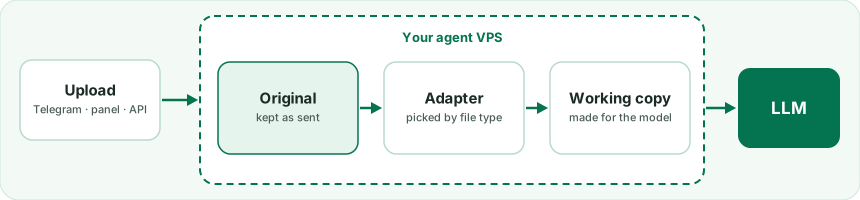
The flow, end to end
-
Upload arrives at the agent VPS. A PDF dragged into the web panel goes straight to your VPS. A photo or file sent in Telegram is fetched from Telegram by the mintbot bot and handed straight on to your VPS — relayed, never stored centrally. The agent's local API sniffs the magic header to work out what kind of file it really is (phones and browsers mislabel surprisingly often), hashes it with SHA-256, and writes it to
/var/lib/mintbot-agent/uploads/<shard>/<sha256>.<ext>. A row goes into a local catalog with the source (telegram / panel / api), uploader ID, MIME type and original filename. Send the same file twice and it's still stored only once.If the conversation works in a project, the agent also puts a copy in that project's
uploads/folder, so it can work on the file right next to the rest of the project. -
The original is sacred. From this point on, nothing inside mintbot ever changes the stored file. Adapters that prepare it for the LLM only make working copies — resized JPEGs, decoded text. The byte-for-byte original stays on disk until you delete it. There is no central bucket, no retention timer, no cross-agent leakage: each agent VPS only knows about its own owner's uploads.
-
The model gets a version made for it. When the agent shows the file to the LLM, a small dispatcher picks the right adapter by MIME type and extension:
Adapter Handles What the model gets Image JPG, PNG, WebP, GIF, HEIC (iPhone), AVIF, TIFF, BMP Resized to a 1568 px long edge, re-encoded as JPEG q85, inlined in the turn. Decoding runs in a separate short-lived process with a memory budget sized to your VPS, so a huge photo can't slow the agent down PDF .pdfup to 32 MBInlined as a native PDF — Claude reads text and layout directly. A bigger PDF stays on disk and the agent pulls the text out itself (e.g. with pdftotext)Text .txt,.md,.csv,.json,.yaml,.svg, source code (.py,.js,.ts,.go,.rs, …), logs, diffsDecoded as UTF-8 (latin-1 fallback) and inlined, up to 500 KB; a longer file is cut there, the full original stays on disk Audio .mp3,.ogg,.opus,.m4a,.wav,.flac,.aacVoice messages from Telegram and the panel's microphone arrive already transcribed. An audio file isn't transcribed automatically yet — the agent gets its location and instructions, and transcribes it when you ask Video .mp4,.mov,.webm,.mkv,.aviNot extracted automatically yet. When you ask, the agent installs ffmpeg(telling you the disk cost first) and pulls out frames or the audio track itselfOffice docs .docx,.xlsx,.pptx, older.doc/.xls/.ppt,.odt,.ods,.odpNot extracted automatically yet. When you ask, the agent installs a small reader library and pulls out the text Unknown Anything else A note with the file's name, type, size and place on disk, plus its first bytes in hex — enough for the model to recognise the file and open it with its tools when the task needs it Every working copy is cached next to the original at
<sha256>.cache/v<N>.json, so the second time the model needs that file it loads instantly. When an adapter changes, the cache rebuilds itself. -
No expiring URLs in model context. When an image or PDF goes to the LLM, it's inlined in the same turn — no URL that could 404 later, no signed link with a timer. Where the model only needs a pointer, the URL is an internal
https://agent<id>.<domain>/<panel_token>/api/local/uploads/<upload_id>/raw— gated by your agent's own panel token, valid for as long as the file lives on disk.
Why this beats the consumer LLM chat experience
When you upload a photo to ChatGPT or a PDF to Claude.ai, the file goes into the provider's storage, attached to that conversation, and the provider's retention policy decides when it disappears. Past a certain age the file is gone, even if you can still see the conversation it lived in. Switching from one provider to another means starting over.
A common Telegram-bot gotcha makes the contrast concrete. Telegram keeps a permanent file_id for every photo, but the download link a bot gets for it is only guaranteed for about an hour. Bots that keep just that link serve a 404 for yesterday's photo. Mintbot copies the bytes into your agent's archive the moment a file arrives — and if you reply to an older photo, it fetches it again through the permanent file_id. From then on, the photo is yours.
Three things follow from this design:
- Files belong to you, not to the LLM provider. Switch from Claude to GPT next month and your file history goes with you, untouched, because it sits on your VPS — not in a vendor's bucket.
- You can re-ask later. "Three months ago you analyzed a contract for me — can you compare it to this new draft?" works, because the original is still on disk. With consumer chat, the older file is usually gone.
- The model always gets the version it can use best. Vision models get the resized JPEG, text readers get UTF-8, PDF readers get native PDF. Phones can upload HEIC and it just works — the image decoder loads Pillow's HEIF plugin, and the magic-byte sniffer catches phones that mislabel the upload as
application/octet-stream.
Where to manage your files
The agent web panel has a File manager under Settings → File manager. It browses the whole agent VPS; the upload archive at /var/lib/mintbot-agent/uploads/ is the part your conversations fill. From there you can:
- Browse folders, download, rename, move or delete files
- Create folders
- Drag and drop new files — uploaded in chunks, up to 4 GB per file
- Edit small text files (up to 1 MB) right in the browser
Size limits: a file you attach in chat can be up to 500 MB; Telegram lets bots fetch files only up to 20 MB; the File manager takes up to 4 GB per file. Past that, the only ceiling is your disk — mintbot always leaves a little free space so the server keeps running. If the disk fills up, the agent tells you and links straight to the File manager so you can clear space, or you can simply ask the agent to delete old files.
Deleting a file in the File manager removes it from disk, and the agent can no longer show it to the LLM. That is what makes the original "yours": you're the only party with delete authority.
Bottom line
Most LLM chat products treat your uploads as throwaway conversation context. Mintbot treats them as your data — stored on your VPS, owned by you, reshaped on demand into whatever form the model needs that turn. Many of mintbot's more interesting capabilities sit on top of this foundation.