Best use cases
mintbot works out of the box. Agents bought with bundled credit start chatting on day one — the default mintbot proxy routes every turn through our pooled LLM credit and deducts the cost from the agent's balance. No API key, no subscription, no setup. While there's credit on the balance, every paid model is open and the proxy picks the best one available by default (currently Claude Opus 5). When the balance reaches zero, the agent doesn't go silent: it falls back to the free Mistral Small until you top up.
But that convenience has a price: the proxy bills per token, which makes it the most expensive way to run an agent long-term. The cheapest way is to plug in an LLM subscription you (probably) already pay for — and you don't need the priciest plan to do it. A $20 / month ChatGPT Plus (or Claude Pro) subscription, connected through the bundled Codex or Claude Code, is the sweet spot for almost every agent.
This page covers when to use which provider, why a $20 subscription is the best-value way to run an agent, when it's worth upgrading, and how to connect it in 60 seconds.
The four ways an agent talks to an LLM
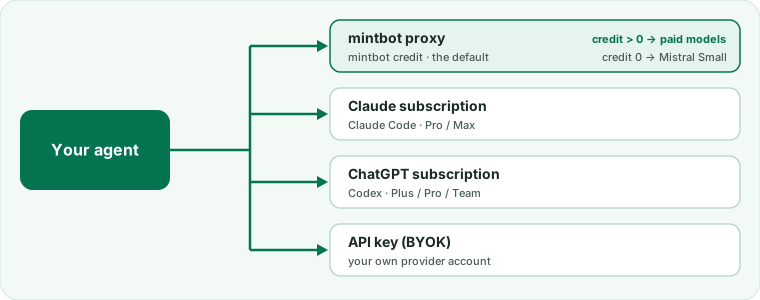
A mintbot agent picks its active LLM provider under Settings → LLM providers in the web panel. There are four routes:
| Route | Who pays | When to pick it |
|---|---|---|
| mintbot proxy (default) | Mintbot meters per token; the credit balance on your agent goes down as it answers. At zero credit it switches to free Mistral Small. | Trying it out. Short tasks. No subscription to plug in. |
| Claude subscription (Claude Code) | Your Claude Pro / Max subscription. No mintbot credit used — only Anthropic's per-account limits apply. | You already pay Anthropic. Long tasks heavy on Claude. |
| ChatGPT subscription (Codex) | Your ChatGPT Plus / Pro / Team subscription. No mintbot credit used — only OpenAI's per-account limits apply. | You already pay OpenAI — or start fresh with a $20 Plus plan. The most cost-efficient way to run an agent. |
| API key (BYOK) | Your own paid account at OpenAI, Anthropic, OpenRouter, NVIDIA, Google Gemini or any OpenAI-compatible service. You pay that provider's API price; the key stays on your agent's server. | You want a model or provider outside mintbot's catalog, or you already have API credit. |
The mintbot proxy is convenient, but it's the most expensive option per token. If you're going to use the agent for real work — drafting, coding, research — connect your own subscription on day one.
Start here: ChatGPT Plus ($20 / mo) is the sweet spot
The best first move is the entry-level ChatGPT Plus subscription at $20 / month. It gives you:
- Codex access with limits that comfortably cover a single agent doing light-to-medium work — drafting, coding, research, the day-to-day.
- OpenAI's current flagship models, the same ones you use in ChatGPT.
Connected to your agent, that $20 replaces the metered mintbot proxy for the vast majority of turns. Compared with spending the same $20 on raw API tokens, Plus buys you far more usage — and for a starter agent it's usually all the capacity you'll ever need. Start here, and only move up if you actually hit the ceiling.
Anthropic works the same way: if you'd rather stay on Claude, the Claude Pro plan (also ~$20 / mo) connects through Claude Code in exactly the same way. Pick whichever subscription you already hold — the Codex route is a recommendation for cost, not a religious preference.
Upgrade to ChatGPT Pro ($200 / mo) once you outgrow Plus
Once the agent genuinely has a lot on its plate — running all day, every day, heavy long-context coding, effectively doing the work of a small IT team — ChatGPT Pro at $200 / month is the natural next step:
- Extended access to OpenAI's flagship models
- Much larger Codex limits — so the effective price per unit of LLM work drops even further
- Everything Plus has, with far more headroom
Pro is the most LLM you can buy for the dollar at the top end. But that value only shows up once your usage is genuinely high — for a fresh agent, the $20 Plus plan wins on value. Treat Pro as the upgrade you reach for when Plus starts running out, not the place to start.
Other plans and more accounts
ChatGPT Team works exactly the same way, with its own limits, and so does Claude Max on the Anthropic side. You can also sign in more than one ChatGPT account (Add another account): when one hits its usage limit, the agent moves on to the next.
Connect ChatGPT in 60 seconds
- Open your agent's web panel (from the Telegram bot's 🌐 Open agent web panel menu).
- Click the provider-and-credit pill under the chat box (it shows the active provider and balance, e.g. mintbot · $5.00), or go to Settings → LLM providers.
- Click + Add LLM provider, then Sign in next to ChatGPT subscription.
- The panel shows a link and a one-time code. Open the link in another tab, sign in to your ChatGPT account and enter the code.
- The panel notices on its own, shows ChatGPT as connected and makes it the active provider.
That's it. The next message you send the agent goes through your ChatGPT subscription.
What happens under the hood
The sign-in runs hermes auth add openai-codex on your agent's VPS — an
OAuth device-code flow — and the token is stored in
~/.hermes/auth.json there. Hermes (the runtime) then talks
directly to OpenAI with that token. There is no proxy in the
middle; mintbot never sees your prompts or your OpenAI account state.
When to keep using mintbot proxy
In some cases it still makes sense to use mintbot credit:
- Trial / demo — no subscription, just kick the tires.
- Managed fallback — when a connected subscription or API key is out of quota, paused, or temporarily broken, you can switch back to mintbot credit and keep working without touching third-party accounts.
For your own personal driver agent — the one you DM from Telegram all day for whatever work comes up — the Codex (or Claude Code) route is the right answer.
Quick-start cheat sheet
1. Start with ChatGPT Plus at https://chatgpt.com/pricing  ($20/mo)
2. Open your agent's panel  (Telegram bot → 🌐 Open agent web panel)
3. Settings → LLM providers → + Add LLM provider → ChatGPT subscription → Sign in
4. Open the link, sign in, enter the one-time code
5. Send the agent a message — it now answers through your ChatGPT Plus subscription
6. Running the agent hard? Upgrade to ChatGPT Pro ($200/mo) for much larger limits — same setup.